
Basic Tutorial | Measure cubature with a level of water

Open the file VolumeClosed.3dr (download).
Select and show only Open Bent Pipe and go to Volume from Elevation. This command can be used to compute volumes over and under a level of liquid inside a closed or an open mesh.
The dialog box opens and you can see that there are two ways to create planes: the Regular way and List of values method. The default method is the Regular creation of planes with a 0.01 m step. The selected pipe is way taller than 1 m, so another option should be used for the exercise.
Select List of values for the Extraction method and enter 0.60m for example. You can see that a plane representing the water level is displayed in the scene.
Click Preview. A window opens showing the level at which the volume was measured and the volumes computed. A measure is also created in the scene.
Click Ok to validate computation and keep the measure.
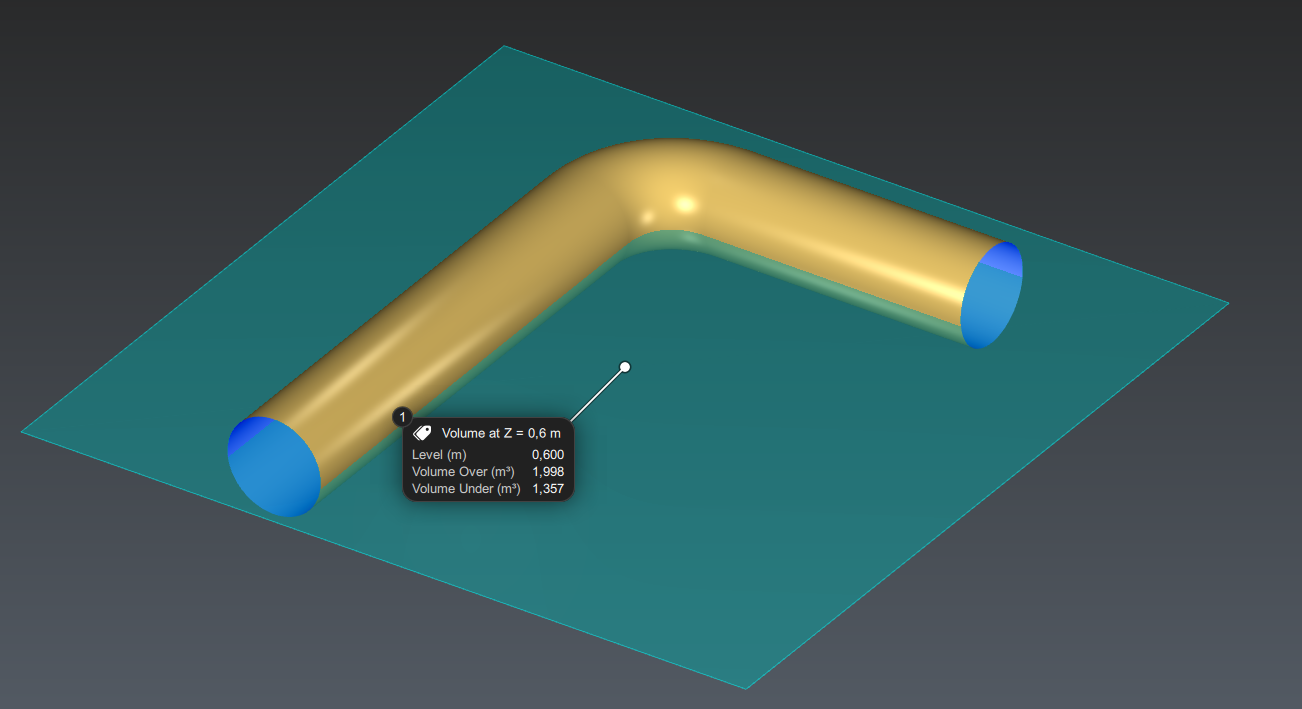
You can try the command with the closed Bent Pipe and with the Straight Pipe. In this case, if the volumes are computed for the same level of liquid, it makes no difference whether the mesh is closed or not because the pipe is closed vertically.
With the option Range, it is also possible to compute volumes between several levels of liquid, distributed along the Z axis with a regular step.